
Roadmap for thought leadership ads linkedin
- Author
- Effy Shkuri
- Published on:
- Published in:
- Video Marketing

Thought Leadership Ads for LinkedIn
Thought leadership ads on LinkedIn allow marketers to ask network members if they can use their content. This is an important part of thought leadership marketing activities. In a B2B context, it's mostly about valuable messages from C-level executives you want to boost, or experts within the organization who share their unique vision.
How it works.
Before creating a thought leader ad, you can start a new campaign or use an existing campaign for brand awareness or engagement. You can also create new ads for existing single image ad and video ad campaigns by editing your campaign.
Roadmap Thought Leadership Advertising
- Ga naar 'Ads Instellen' in Campaign Manager Nieuwe Campagne: Na het selecteren van je campagne-instellingen, ga je automatisch naar 'Ads Instellen'. Bestaande Campagne: Bewerk de campagne om naar 'Ads Instellen' te gaan.
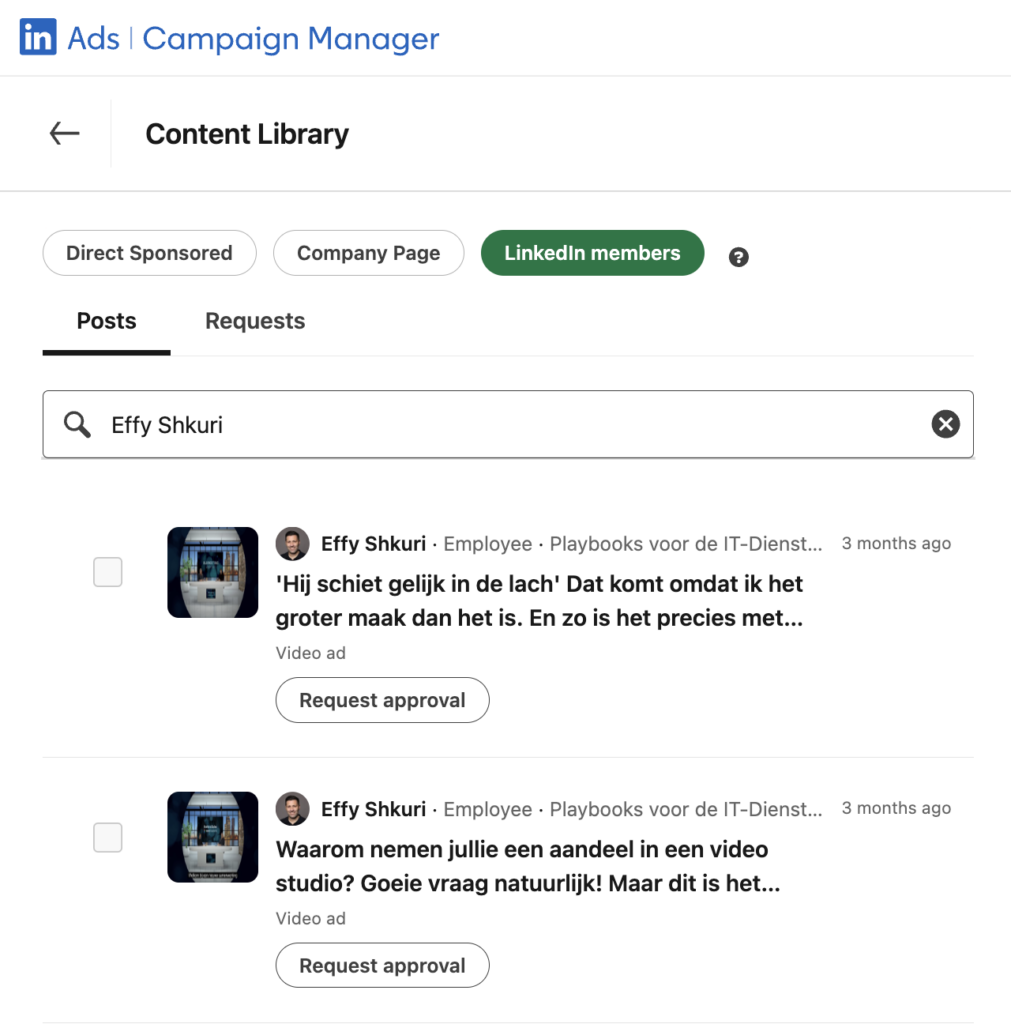
- Click 'Browse Existing Content' to open the Content Library page.
- Klik op 'LinkedIn Leden' om te zoeken en lidposts te selecteren die je wilt sponsoren. Gebruik het tabblad 'Posts' om te zoeken naar posts van medewerkers of 1e/2e graads connecties.
- Select the Desired Item and click "Request Approval" to submit a sponsorship request.
- Use the Requests tab to view and filter sent requests.
- The member will receive an email notification requesting approval.
- After approval, you will be notified in Campaign Manager and will be able to sponsor the requested item.
Important Considerations
- Members can choose to approve a single sponsorship request or all future requests.
- Members may withdraw their approval, after which the ad will be immediately disabled.
Related Tasks
- Gain access to ad accounts in Campaign Manager
- Creating a LinkedIn Ads campaign - see tips for video
- Boosting a post from a LinkedIn page
- Manage permissions to sponsor organic posts as thought leader ads
Learning and Optimization
Thought leader ads help keep your content engaging and relevant by using authentic member experiences - see article from LinkedIn.
Requirements and Permissions
| Area | Required |
|---|---|
| Posts | You can promote posts from collaborators and 1st/2nd degree connections. |
| Promoting Posts | Articles and images are possible. Newsletters, polls, reshared posts are not. |
| Campaign Authorizations | Super admin, content admin or Sponsored Content poster permissions required. |
| Campaign Goals | Only brand awareness and engagement. |
| Ad formats | Single image ad or video ad. |
| Report | Campaign Manager reports on performance; members see combined organic/paid reach. |
| Request Limit | No limit per thought leader. |
| CTA | No button, but URLs in the intro text. |
By following these guidelines, you can create effective thought leader ads on LinkedIn and achieve your brand goals.
Effy Shkuri
"Our people make the difference." Really? As a former "digital workplace & IT entrepreneur," I've said this for years about my 25 colleagues. But the reality is we were only considered thought leaders by 5% of our target audience. Even today, this remains a common statement from MSPs and IT service providers. But these words lose their meaning if your expertise does not extend beyond your existing customers and a handful of prospects. I now help IT entrepreneurs with thought leadership in their niche.